17 July 2011
Dynamics Ax EventIds
The only information Google finds about Dynamics Ax EventIds from Microsot is in Italian and very old (2005). Translationg it with BabelFish gives at least the chance to understand it (for a non Italian-speaking person). Would be great if Microsoft could at least publish this document in English, which shouldn't be a big deal, since this is the same text as in the original message definition file and publish it for Ax 2009 and 2012, too.

16 July 2011
AOS service does not stop and stays pending (what happens when the AOS stops)
In my article about stopping AOS services via PowerShell, I implemented a timeout for stopping the AOS gracefully before killing that service. In that script I set the timeout to 60 sec, which should be more then enough under normal circumstances. If this timeout needs to be different for you, just change that. But at the end, you need to be sure that the AOS service is stopped, and if it isn't, the service needs to be stopped by killing the process.

Why can an AOS stuck in a pending state?
First an explanation what the AOS does when it is stopped: The AOS is managed by the service control manager (MSDN/Wiki) (SCM). This SCM does send the messages STOP, PAUSE, CONTINUE and SHUTDOWN to the AOS, which does react on these messages. In my script, I'm using the .Net class ServiceController to work with the SCM in a very comfortable way because the .Net class wraps the Win32 API (PInvoke) and guarantees you a safe way to work with windows services. By calling the Stop method, the script just sends a STOP message via SCM to the AOS and, if the main-thread of the AOS service does have time to handle that message, it will set the first set the service in a pending state and then trigger the Shutdown. The shutdown of an AOS does first interrupt all user sessions (you might find this message in the event-log: "Object Server 01: RPC error: Client provided an invalid session ID 9") , then terminates the server session ("Object Server 01: Server main session is being destroyed.") and once all these sessions are closed, it will then remove the RPC interface from the RPC run-time library registry and then stop listening to the RPC calls. Only then the SCM sets the status of the AOS to stopped. (This article on MSDN shows in a very simple example what the AOS does for disposing the RPC, too).
So there shouldn't be any problem when stopping the AOS, but unfortunately the AOS does sometimes not succeed to stop the service gracefully and this happens only from time to time when the AOS is under stress and it is therefore difficult to reproduce. But because the shutdown waits until the ServerSession is terminated, it is enough to freeze the thread of the AOS session with a sleep.
Killing the AOS might terminate open connections to the SQL-Server as well. But because CUD (create, update and delete) operations are done within transactions, killing the AOS-service shouldn't break the database integrety - if no custom code breaks this best-practice. Just keep in mind that you will loose all data of non-committed transactions.

Why can an AOS stuck in a pending state?
First an explanation what the AOS does when it is stopped: The AOS is managed by the service control manager (MSDN/Wiki) (SCM). This SCM does send the messages STOP, PAUSE, CONTINUE and SHUTDOWN to the AOS, which does react on these messages. In my script, I'm using the .Net class ServiceController to work with the SCM in a very comfortable way because the .Net class wraps the Win32 API (PInvoke) and guarantees you a safe way to work with windows services. By calling the Stop method, the script just sends a STOP message via SCM to the AOS and, if the main-thread of the AOS service does have time to handle that message, it will set the first set the service in a pending state and then trigger the Shutdown. The shutdown of an AOS does first interrupt all user sessions (you might find this message in the event-log: "Object Server 01: RPC error: Client provided an invalid session ID 9") , then terminates the server session ("Object Server 01: Server main session is being destroyed.") and once all these sessions are closed, it will then remove the RPC interface from the RPC run-time library registry and then stop listening to the RPC calls. Only then the SCM sets the status of the AOS to stopped. (This article on MSDN shows in a very simple example what the AOS does for disposing the RPC, too).
So there shouldn't be any problem when stopping the AOS, but unfortunately the AOS does sometimes not succeed to stop the service gracefully and this happens only from time to time when the AOS is under stress and it is therefore difficult to reproduce. But because the shutdown waits until the ServerSession is terminated, it is enough to freeze the thread of the AOS session with a sleep.
public server static void FreezeAOSSessionThread()
{
    ;
    sleep(60000);
}
Calling the sleep on the client wouldn't work, because the client-sessions are killed. In no case, the client can prevent the AOS to stop and hold him in a pending state (In all cases I could track back, the situation on the AOS was similar: The AOS-session could not be terminated). If you are looking for the cause, take a dump with ADPlus from the AOS and check the X++ call stack. Once again, thank you Tariq... Attach AdPlus to the process and kill the process with the task-manager. The dump will then automatically taken.Killing the AOS might terminate open connections to the SQL-Server as well. But because CUD (create, update and delete) operations are done within transactions, killing the AOS-service shouldn't break the database integrety - if no custom code breaks this best-practice. Just keep in mind that you will loose all data of non-committed transactions.
14 July 2011
My first AIF project is finally flying :-)
Finishing a project is always the most thrilling moment in a project. Seeing finally the application been used by customers and colleagues is just magic and the major reason for me to work in the IT...
7 months of hard work and the new EDI platform for the purchase and sales process is finally flying. The publicly visible part of the eCommerce is the WebShop which is a custom .Net Web-application that is communicating via BizTalk with the AIF framework. Because of the quite disappointing standard AIF-services, I decided to create a complete new EDI-platform on top of AIF. The platform is now online for the German subsidiary of Camfil, but it will be soon rolled out in most other European countries. I hope I will find the time to blog about some of the strategic key elements of that architecture in the next weeks (why not using the Enterprise Portal or the standard AIF services, how to prevent performance bottle necks, testing AIF services and integrating EDI smoothly into standard processes)
A big thank you, Mathias, Alex, Sebastian, Markus, Peter and Bettina, for all your great work :-)
7 months of hard work and the new EDI platform for the purchase and sales process is finally flying. The publicly visible part of the eCommerce is the WebShop which is a custom .Net Web-application that is communicating via BizTalk with the AIF framework. Because of the quite disappointing standard AIF-services, I decided to create a complete new EDI-platform on top of AIF. The platform is now online for the German subsidiary of Camfil, but it will be soon rolled out in most other European countries. I hope I will find the time to blog about some of the strategic key elements of that architecture in the next weeks (why not using the Enterprise Portal or the standard AIF services, how to prevent performance bottle necks, testing AIF services and integrating EDI smoothly into standard processes)
A big thank you, Mathias, Alex, Sebastian, Markus, Peter and Bettina, for all your great work :-)
13 July 2011
Windows PowerShell Cookbook
Because I already blogged about PowerShell-scripts for administration tasks, here a link to great online-book from Lee Holmes about everything you need to know about programming PowerShell and much, much more. You can order it on Amazon, too.
12 July 2011
Windows EventLogs with X++
Here's a very small and simple class that makes it very easy to use the Windows EventLogs with X++. It creates, if necessary, a new log/source and logs the events there:


The job TestEventLogs is an example how to write EventLogs:

Just derive from the abstract base-class "WinEventLogsBase" (as it is done in WinEventLogs_Batches) and overwrite the log/source and messageId, so that your events are unique.

The job TestEventLogs is an example how to write EventLogs:
static void TestEventLogs(Args _args)
{
    WinEventLogsBase logs;
    System.Diagnostics.EventLogEntryType type = System.Diagnostics.EventLogEntryType::Error;
    System.Int32 eventId = 110;
;
    //Works well, but in the EventLog for Workflow events
    SysWorkflowHelper::writeEventLogEntry("Test simple error from Workflow.");

    //uses the EventSource for the Dynamics Server with the instance suffix to write a message
    System.Diagnostics.EventLog::WriteEntry("Dynamics Server 01", "Test simple error with WriteEntry.");
    //will result in:
    //The description for Event ID ( 0 ) in Source ( Dynamics Server 01 ) cannot be found.
    //because this source is linked to the ressource:
    //C:\Program Files\Microsoft Dynamics AX\50\Server\DynamicsAx1\Bin\Ax32Serv.exe
    //in HKEY_LOCAL_MACHINE\SYSTEM\CurrentControlSet\Services\Eventlog\Application\Dynamics Server 01
    //which doesn't know how to handle that EventId

    //now by selecting the Dynamics Ax standard EventId 110:
    System.Diagnostics.EventLog::WriteEntry("Dynamics Server 01", "Test simple error with WriteEntry.", type, eventId);
    //Works pretty fine, but: always the same EventSource and EventId, which is not possible to track for many
    //monitoring tools like for example Heroix Longitude which do only interpret the EventId.

    //now that little tool:
    logs = new WinEventLogs_Batches(); //specialization for logs

    //WinEventLogs_Batches uses an EventSource and EventLog on its own
    logs.writeError("Test simple error");  //uses a default EventId
    logs.writeInfo("Test simple info", 4711); //uses an explicit EventId
    logs.writeWarning("Test simple warning");

    logs = new WinEventLogs_Test(); //specialization that uses the Eventlog "Application" for the source

    //WinEventLogs_Test uses its own EventSource but "Application" as EventLog
    logs.writeError("Test simple error");
    logs.writeInfo("Test simple info", 4712);
    logs.writeWarning("Test simple warning");
    //because this tool links the registered EventSource to:
    //c:\WINDOWS\Microsoft.NET\Framework\v2.0.50727\EventLogMessages.dll
    //it is now possible to use any custom EventId which is not predifined in the resource like in the
    //first example.
}
10 July 2011
Authenticating a user with user-name and password against Windows with X++
The AccountManagement Namespace was introduced with .Net 3.5 and provides some very useful classes which are, by referencing this assembly, available with X++, as well. At least if you've installed .Net 3.5.
Here's an example how to authenticate a username and password against Windows with the PrincipalContext class and the ValidateCredentials-method.
Update: (15/07/11) And bcause of the Google search keywords: The username and password for the contoso.com VPC are Administrator and Passw0rd (or pass@word1 depends on the vpc) ... ;-)
Here's an example how to authenticate a username and password against Windows with the PrincipalContext class and the ValidateCredentials-method.
boolean isAuthenticated = false;
System.DirectoryServices.AccountManagement.PrincipalContext principalContext;
;

principalContext = new System.DirectoryServices.AccountManagement.PrincipalContext(System.DirectoryServices.AccountManagement.ContextType::Domain, "contoso.com");
isAuthenticated = principalContext.ValidateCredentials("username", "password");
principalContext.Dispose();

if (isAuthenticated)
{
    //do something
}
else
{
    //do something
}
Update: (15/07/11) And bcause of the Google search keywords: The username and password for the contoso.com VPC are Administrator and Passw0rd (or pass@word1 depends on the vpc) ... ;-)
09 July 2011
Authentication of the different components in Ax 2009
One of the most annoying subjects in Ax2009 is installing and configuring the huge number of components which do need to authenticate each other. There are Reporting Services, Analysis Services, SharePoint Services (or MOSS) on IIS, AIF MSMQ, AIF WebServices, AIF BTS, the Ax AOS, Internet Explorer, SMB for the application file-share and the Ax client (some do have BC.Net applications as well). If they are all installed on one box, this is quite easy to maintain. But a distributed installation (especially on a large scale) is extremely complicated and requires a profound understanding of Kerberos authentication. Because I recently had to find an issue on my erroneous installation, here's a nice schema of my current Ax 2009 configuration which might help you as well:

06 July 2011
PowerShell script to restart Windows (AOS) services remotely
Just a small script to restart a list of Windows-services (download here). It checks that they are stopped and kills them if they cannot be stopped and then starts them. If there are any errors, an email is sent and the user is informed about the progress in the tray-bar. All this is configurable in an Xml-file. It's a small script and should only be used as an example of how the PowerShell can be useful for the daily business (please understand that I don't publish the final version):
- stopping and starting services remotely
- killing a process remotely
- getting ProcessId from service-name
- sending a mail
- executing WMI queries on remote machines
- pinging machines
- Info-bubble in the tray bar
- creating and writing into EventLogs
- handling exceptions
- working with Xml-files
- passing parameter to a function
- working with ref-variables
Update: (09/07/11) Updated script with some fixes and changes in the behavior.
Update: (10/07/11) As this was my first experience with PowerShell scripting, I rewrote the script with all what I learned during these days. The script does now restart remotely in a controlled way the services and tracks all info about the executed activities and anomalies during this process.
Update: (23/07/11) Still novice with PowerShell... :-( Refactored the code so that it is now using the pipeline instead of referenced arguments.
02 July 2011
Links about the Ax 2009 batch-framework
Some interesting links:
- Tariq wrote on the EMEA DAX support blog an interesting article about how batches are processed in Ax2009. Thanks a lot for that, Tariq :-)
- A nice How-To about debugging batches
- Processing batches on clients.
- Tom Stumpf (Ax in the field) on Ax batch performance tuning
- How to start a specific Batch Group during Startup
- Multithreading in Batches on Art Of Creation
26 June 2011
Batchable AxdSend-class in Ax2009 and Ax2012
The AxdSend-class is a very easy to implement class, that helps you writing outbound services for Dynamics Ax 2009 and 2012. The AxdSendExchangeRates-class from Ax 2009 (not existing in Ax 2012 anymore) gives you an idea of how to use this class. Unfortunately there are some reasons why the AxdSend-class cannot run as-is in batches:
- The base class: The AxdSend-class needs to derive from RunBaseBatch.
- The dialog: The dialog is built on the axdSend-form which does not provide the 'tab'-control for the RunBaseBatch-dialog. This form needs to be modified by adding a new tab-control named 'tab'. Otherwise you would get an exception from the buildControl-method in the DialogForm-class. Btw: The name 'tab' is hardcoded in the tabName-method of the same class.
- The method sendMultipleDocuments: calling this method results in calling the run-method, and, as you know, batches are executed by calling the run-method...
Changing this would let the AxdSend-class be 'batchable', but unfortunately the class wouldn't be executable in the interactive mode anymore. This, because the dialog form from the AxdSend, which is opened by calling the prompt-method, requires these members being initialized:
- aifDocumentClassId
- serviceClassId
- aifConstraintList
- aifSendMode
- sendActionType
- aifActionId
My suggestion here is to create a new base-class for batchable AxdSend-classes to isolate these modifications as much as possible. You can download a private project that contains my modifications/new classes for Ax2009 in all concerned AOT-objects:
- AxdSend-class
- axdSend-form
- AxdBatchableSend-class (custom base-class)
- AxdSendExchangeRates as an example how to use the AxdBatchableSend class
The batch will use the endpoint that is stored in the usage-data. So the batch needs to be executed at least once in the interactive mode.
Important note:
Importing this project will overwrite these objects and overwrite all modifications in the same layer, too. Please be careful when importing the project.
These modifications are not compatible with Ax2012, but it requires only slight changes to adapt this to Ax2012. I will upload a project for Ax2012 once Ax2012 is released.
Update: (30/06/11) I fixed an issue with the initialization of the endpoint-list.
Update: (02/07/11) Ups, fixed an issue with the dialog initialization.
Update: (04/07/11) Sends only message if query returns more than one element.
Important note:
Importing this project will overwrite these objects and overwrite all modifications in the same layer, too. Please be careful when importing the project.
These modifications are not compatible with Ax2012, but it requires only slight changes to adapt this to Ax2012. I will upload a project for Ax2012 once Ax2012 is released.
Update: (30/06/11) I fixed an issue with the initialization of the endpoint-list.
Update: (02/07/11) Ups, fixed an issue with the dialog initialization.
Update: (04/07/11) Sends only message if query returns more than one element.
19 June 2011
The BC.Net in Dynamics Ax 2012
I've never been a fan of using the BC.Net in client applications. It's true that this is a very easy to use interface, but in most use-cases the Ax-client or the AIF are a better choice. The BC.Net is in fact a regular Ax-client without UI (user interface) and this means that it requires such an installation with the application that has been written - with all the constraints of the Ax-client plus some BC.Net specific ones:
PS: And don't forget that there is no COM.BC available with Dynamics Ax 2012.
- Local BC.Net installation (not easily maintainable when deploying on a larger scale)
- Dynamics Ax 2009 doesn't support side-by-side installations of clients (inflexible architecture)
- RPC-protocol (constraint for the infrastructure: Firewall)
- No multi-threading (lousy performance). Using multi-threading with the BC.Net results always in exceptions.
- No session-management. Only one session at a time. (no scalability) A very complex session-management needs to be written.
- No contract for the method and its signature (difficultly maintainable when application changes over the time) as it is available with the AIF (service+Xsd or Wsdl with AIF-WebServices)
- BC.Net requires the Enterprise Portal license when hosted by the IIS (this constraint is hardcoded in the BC.Net)
PS: And don't forget that there is no COM.BC available with Dynamics Ax 2012.
Exporting AIF endpoints with Dynamics Ax 2012
What a good news in Dynamics Ax 2012! The nightmare while deploying AIF endpoints has finally an end and you do obviously not need to be worried about changed classIDs and RefRecIds (AifDataPolicy does reference AifDocumentField by the RecId) anymore. Here's a guide how to export the endpoints by definition groups in Ax 2012 on Msdn.
.Net 4.0 client profile not enough for the Dynamics Ax BC.Net
On Dilip's blog on Dynamics Ax, Dilip suggests in his article on BC.Net compatibility settings, to switch from .Net Framework 4.0 Client Profile to .Net Framework 3.5 with the argument, that this makes sense because the BC.Net is compiled on top of the .Net 3.5 Framework.
UPDATED 17/112011: Dilips first article was about the error message during the compilation and I was referring to the compile-time compatibility that .Net4 guaranties. The updated article now is talking about the runtime-compatibility.
Anyway, the useLegacyV2RuntimeActivationPolicy is, despite of its name, not executing the application in a different CLR context (CLR2), but does translate some legacy shim APIs to the current CLR4, as explained in this great article about this attribute. So even by using this attribute we are, as promised by Microsoft, fully .Net 4 :-)
I was surprised reading this, because Microsoft promised backward compatibility and the .NET Framework 4:
The .NET Framework 4 is backward-compatible with applications that were built with the .NET Framework versions 1.1, 2.0, 3.0, and 3.5. In other words, applications and components built with previous versions of the .NET Framework will work on the .NET Framework 4.
The errormessage when compiling the BC.Net application against the .Net 4.0 client was:
...could not be resolved because it has a dependency on "System.Web....
So why do BC.Net projects don't compile with client profiles ? To answer this, browse through the BC.Net assembly with the .Net Reflector or, because it's open-source and free: ILSpy and you will notice that the BC.Net does reference for the BC.Net 2012 'Microsoft.Dynamics.AX.ManagedInterop' and this references the 'System.Web' assembly. The BC.Net 2009 does directly reference the 'System.Web'-assembly.
Now, having a look on Msdn for the .Net 4.0 client profile, it is documented:
The .NET Framework 4 Client Profile does not include the following features. You must install the .NET Framework 4 to use these features in your application:
- ASP.NET
- Advanced Windows Communication Foundation (WCF) functionality
- .NET Framework Data Provider for Oracle
- MSBuild for compiling
The 'System.Web' assembly, which is part of the System.Web-namespace and so not part of the reduced .Net framework runtime, requires the full .Net 4.0 Framework. Now select the full .Net 4.0 Framework for compatibility and compile it again. It will work. Selecting the .Net 3.5 client profile will, of course, result in the same error. As I mentioned, this is true for the BC.Net of Dynamics Ax 2009 AND 2012.
UPDATED 02/07/2011: Dilip updated his article with a very interesting information about the runtime-compatibility of applications referencing the BC.Net assembly: It requires the useLegacyV2RuntimeActivationPolicy attribute to be set to true. But read his article fur further information.
UPDATED 02/07/2011: Dilip updated his article with a very interesting information about the runtime-compatibility of applications referencing the BC.Net assembly: It requires the useLegacyV2RuntimeActivationPolicy attribute to be set to true. But read his article fur further information.
UPDATED 17/112011: Dilips first article was about the error message during the compilation and I was referring to the compile-time compatibility that .Net4 guaranties. The updated article now is talking about the runtime-compatibility.
Anyway, the useLegacyV2RuntimeActivationPolicy is, despite of its name, not executing the application in a different CLR context (CLR2), but does translate some legacy shim APIs to the current CLR4, as explained in this great article about this attribute. So even by using this attribute we are, as promised by Microsoft, fully .Net 4 :-)
08 February 2011
Aif changes implicitly document schema when changing underlying table
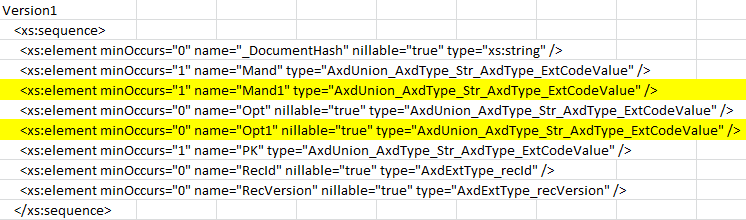
Changing the mandatory property of fields in tables that are used in Aif-documents does change implicitly the document schema. The table FDI_AifModTest_CF does have the following fields: PK, opt, opt1, mand and mand1. The mandatory fields are flaged aith "m":
Then, in a second step, the mandatory field is changed as descibed in the first graphic. After refreshing the Aif-services the document schema changed without any notification:
 |
| Mandatory fields in version 1 and 2 |
In the beginning the mandatory fields of the table are: PK, mand and mand1.
After having created and configured the Aif-service, the document schema looks like this:
 |
| Document schema according the version 1 |
 |
| Document schema according the version 2 |
So this shows that changing the field to mandatory changes the schema, but changing from mandatory to optional does not change the schema. The schema change does make sense but unfortunately this is done completely transparent to the user and there is by default no possibility to get notified by this. So, doing an Aif-service refresh can cause regressions and has to be done with precaution.
15 January 2011
Specific order of fields in Aif messages
Aif-messages require the data to be defined in a specific order. This is why in the schema file, the Aif data-types (declared as complex types) are declared with the xs:sequence indicator:
Example from the DirAddressService:
...
This is particularly surprising, as the elements in an entity are always ordered alphabetically... :-\
Example from the DirAddressService:
...
......
This is particularly surprising, as the elements in an entity are always ordered alphabetically... :-\
Aif message header editor (reloaded)
I reviewed the code and made it now usable "as is". So it is now more then just a proof of concept :-) The project is hosted on CodePlex under the new GNU license (so that you can do whatever you like to do with the code without restrictions).
This tool makes it now possible to modify the content of the Aif-message and to change the file-owner, which is used by Aif to authenticate messages by comparing the file-owner with the source endpoint user.
The tool has a graphical user interface and a simple comand-line interface, so that you can include this tool in scripts which makes it easier to automize creating messages.
The Guid looks like this:

It is very easy to use: just open the valid Xml-file with the "..."-button. If the Xml-files are associated with this tool, a double-click will work, too. Then choose your destination directory. This will be probably the directory that you configured for the incoming messages in Dynamics Ax and choose the same user for the file owner and the "source endpoint user". The Aif authenticates the Aif-user by comparing the "source endpoint user" in the header with the document owner.
A new functionality is the command-line interface:

Type "-help" for a simple "how-to" use this tool and include this in your cmd-script for an automized file-creation...
This tool is provided "as-is", and nobody (including me), will be responsable for any damage this tool might cause... ;-)
Please feel free to report any issues on the project homepage or just drop me a mail.
15 December 2010
Namespaces in Aif Xml-messages
In a previous posting I described the structure of a Dynamics Ax 2009 Aif message. Here now some information about Namespaces in Aif Xml-messages:
An Aif Xml message is identified by namespaces on 3 locations:
- the Xml-envelope (1)
- the Aif-service (2)
- the Xml-messageparts (3) + (4)
According to my previous posting:

These information are defined in Ax in the following places:
Macros
Aif: (1) + (3)
#define.MessageNamespace ('http://schemas.microsoft.com/dynamics/2008/01/documents/Message')
#define.EntityKeyNamespace ('http://schemas.microsoft.com/dynamics/2006/02/documents/EntityKey')
#define.EntityKeyListNamespace ('http://schemas.microsoft.com/dynamics/2006/02/documents/EntityKeyList')
Axd: (3) used as standard namespace for all Axd-documents by default:
#define.DocumentNameSpace('http://schemas.microsoft.com/dynamics/2008/01/documents')
Services nodes (2) as described on msdn

X++ (4) the default Axd-document namespace in the AxdBase-class by the getNamespace()-method

(4) if the Axd-document namespace can be overridden in the Axd-class:

An Aif Xml message is identified by namespaces on 3 locations:
- the Xml-envelope (1)
- the Aif-service (2)
- the Xml-messageparts (3) + (4)
According to my previous posting:
These information are defined in Ax in the following places:
Macros
Aif: (1) + (3)
#define.MessageNamespace ('http://schemas.microsoft.com/dynamics/2008/01/documents/Message')
#define.EntityKeyNamespace ('http://schemas.microsoft.com/dynamics/2006/02/documents/EntityKey')
#define.EntityKeyListNamespace ('http://schemas.microsoft.com/dynamics/2006/02/documents/EntityKeyList')
Axd: (3) used as standard namespace for all Axd-documents by default:
#define.DocumentNameSpace('http://schemas.microsoft.com/dynamics/2008/01/documents')
Services nodes (2) as described on msdn


(4) if the Axd-document namespace can be overridden in the Axd-class:

11 November 2010
AIF surprises with verbose responses...
The title could also be "AIF security whole", but I choosed the understatement ;-)
Using QueryCriteria to filter can result in returning all data it you do an error in your request. To describe this, lets take the standard AddressService and do a find request by using the FileSystemAdapter. Here's a correct requst example:
Now the QueryCriteria does contain an error (I removed the CriteriaElement):
Normally this cannot be validated because it is not conform to the schema
defined in the QueryCriteria.xsd. The QueryCriteria elemet riquires to have at least one CriteriaElement:
But instead of not validating the document of the request, AIF decides to return all data. This behavior can be reproduced on any standard or custom AIF document service.
It is very likely that the Aif-services do not validate incoming Xml messages (as it is configurable for outgoing messages!) for performance reasons, but it should be possible to configure this nevertheless.
Using QueryCriteria to filter can result in returning all data it you do an error in your request. To describe this, lets take the standard AddressService and do a find request by using the FileSystemAdapter. Here's a correct requst example:
  {DD112222-0306-1220-0001-DD33444455DD}
  DYNAMICS\Administrator
  Sample
  Contoso
  http://schemas.microsoft.com/dynamics/2008/01/services/AddressService/find


  Address
  Name
  Equal
  Sit*
Now the QueryCriteria does contain an error (I removed the CriteriaElement):
  {DD112222-0306-1220-0001-DD33444455DD}
  DYNAMICS\Administrator
  Sample
  Contoso
  http://schemas.microsoft.com/dynamics/2008/01/services/AddressService/find


  Address
  Name
  Equal
  Sit*
Normally this cannot be validated because it is not conform to the schema
defined in the QueryCriteria.xsd. The QueryCriteria elemet riquires to have at least one CriteriaElement:
But instead of not validating the document of the request, AIF decides to return all data. This behavior can be reproduced on any standard or custom AIF document service.
It is very likely that the Aif-services do not validate incoming Xml messages (as it is configurable for outgoing messages!) for performance reasons, but it should be possible to configure this nevertheless.
08 November 2010
Dyanmics Ax 2009 AIF message
Here is a simple schema of the AIF message structure based on the Dynamics Ax 2009 AIF Xsd-schemas: The two principle elements of an AIF message are the message header and the message body.
All elements in the schema with exception of the "any" element (part of the message body) are explicitly defined by a Microsoft namespace (like http://schemas.microsoft.com/dynamics/...). The custom schema (by default deduced from the document underlying query) need to be explicitly defined by its own namespace. A namespace will define the service by default by its editor (like schemas.microsoft.com), its version (defined by its creation date: yyy/mm) and its purpose: the name of the service. This might be for example: http://yourcompany.com/2010/11/services/YourCustomService
The AIF actions are associated to the namespace of the message. A message header might for example look like this:
The two principle elements of an AIF message are the message header and the message body.All elements in the schema with exception of the "any" element (part of the message body) are explicitly defined by a Microsoft namespace (like http://schemas.microsoft.com/dynamics/...). The custom schema (by default deduced from the document underlying query) need to be explicitly defined by its own namespace. A namespace will define the service by default by its editor (like schemas.microsoft.com), its version (defined by its creation date: yyy/mm) and its purpose: the name of the service. This might be for example: http://yourcompany.com/2010/11/services/YourCustomService
The AIF actions are associated to the namespace of the message. A message header might for example look like this:
        {3B7C23AB-B0EF-4C35-8DC6-481574080F62}
        Default
        Default
        http://yourcompany.com/2010/11/services/YourCustomService/read
        {C8111B69-9786-4BB4-9A03-D0BE847F4C3C}
11 October 2010
Listing changed objects in a rollup
Once a rollup archive has been decompressed, a manifest file is accessible in the root-directory of the extracted files. In the RU5 for the SP1 (KB982812) this file is called “dynamicsax2009-kb982812-sp1-manifest.xml”. So far so good. Unfortunately this manifest file can be very large and is over 1GB for the RU. This because the file contains not only the changes, but also all dependencies, with makes this file so verbose.
The TransformTool is very simple tool and might help you working with these data by transforming the original manifest data into a much less verbose xml-file:
The TransformTool is very simple tool and might help you working with these data by transforming the original manifest data into a much less verbose xml-file:
Subscribe to:
Posts (Atom)